

Smart-Bus Dynamic Display Panel DDP Slim - SB-DDPs-UN
GTIN(UPC-EAN):
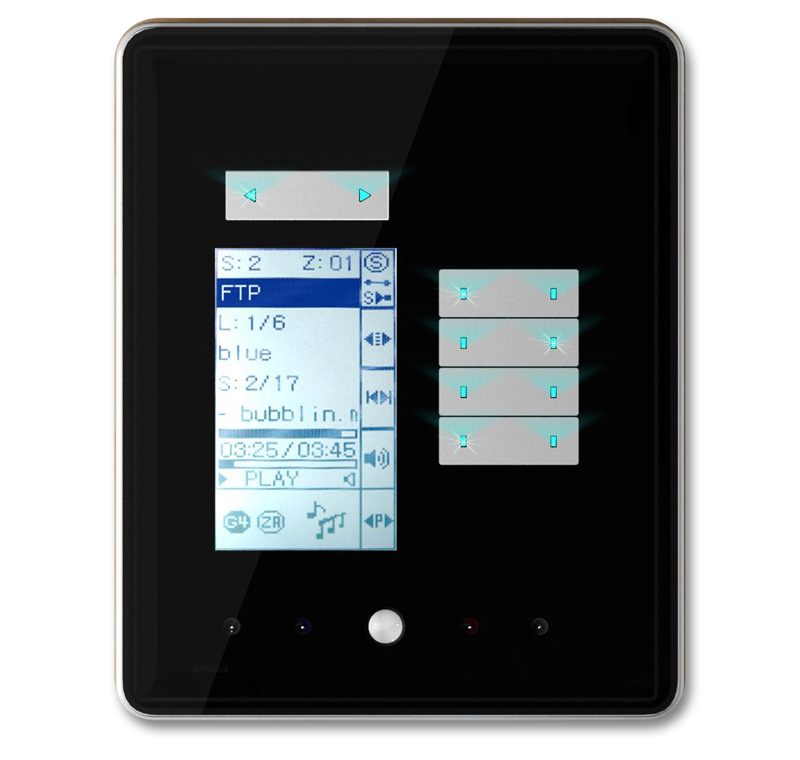
• Multi IR/AC Control Pages
• 8 slave +1 Master HVAC (FCU\AHU)
• Clapper Mic Sensor Built in
• IR Eye Built in (Receive Hand Held Remote control commands)
• Lux Sensor Built in (Light Intensity Adjustment according to sun light)
• PIR Motion Sensor Built in (For Energy Saving Occupancy, and Security)
• 2Z (NO\NC) DI
• IR Emitters (Flashers) with 255 IR cod s menus
• Logic 32 tables ×8 lines
• Security 99 codes
• LED (RGB) Surround Wall Effect
• Menu buttons on top modified for easy use
• Blue Back lit Buttons
• Built in temp sensor thermostat
Added Logic Condition
- If temp
- If lux
- If occupancy
• Slim Elegant Design
• Fruit Basket Finishes and Variety of Materials and Patterns to fit any Decor
• Fits most Wall Back Box Standards: (UK, Germany, France, Australia,USA, South Africa and Other)
• Trail Click Ready (Simply Add any TC Module to Back of DDPs.
• S-wave compatible
• Ceiling Fan Speed Control Added
• Password / Code Entry Feature Added
WHY G4 (GENERATION-4) IS BETTER? DDP, FDP, 6B, 4B, 3B
Switches and wall panels (Features compared) |
Old Smart-BUS |
New S-BUS G4 |
Buttons and Surround Finish Material Improvement |
Plastic |
Aluminum |
Glass Material Improvement |
Thick & Bulky |
I Phone Quality 0.8mm Glass |
Back Module Size |
Do not Fit all Countries |
Fits all countries |
Upgrading without opening the Device |
Not Possible |
By Mini USB |
Ability to Snap Connect/Disconnect Cables |
Not Possible |
Snap In Connector |
Ability to Locate IR receiver nearer to user location |
Not Possible |
Flexible with Snap in Connector |
PCB Electronics Design Complexity |
2 Complex Boards |
Single simple Board |
User Graphics Interface |
Standard |
Improved Icons |
Integration to Z-Audio with auto update |
Manual |
Advanced Auto |
Fixed Display Panel (FDP) |
Not Available |
Available |
Easy Backup and Restore using Configuration SW |
Not Available |
Available |
Work on Both BUS and Cloud Technology |
Not Possible |
Possible |
Buttons Size and Workability of Soft switches (1-6 Gang) |
Smaller, single side operation |
Wider and Bigger with Both sides Operation |
Panels Security not to be simple to remove from wall |
Not Secure |
Secured by Clamps, Magnets, and screw Locks |
Metal Plate Twist and Screw Installation Simplicity |
Not Possible |
Possible |
Design Standards |
Asian Curved Design |
Modern European Touch |
Anti static Electricity Grounding and discharge |
Not Part of Original Design |
Embedded and Implemented in Design |
Programming and Pairing Manually to Lighting, Dimming, HVAC, and Music |
Not Possible |
Easy |
Flexible Fascia changing (many varieties) |
Difficult, Very Thick |
Easy |
All Other Standard Smart-BUS Advanced Automation Features |
Included |
Included |
Under Construction
Q. If the customer wants to stop the shutter in the middle, how it can be done? Must use logic?
A. If you would like to add the function of stopping shutter, you don't need make the logic. You can do the programming as following:
Make one button on DDP as the function of stopping shutter:
Button Mode: Combination off,
Button configuration: suppose to you are using CH 1 & CH 2 as shutter, make ch1 & Ch2 both off
Q. How to Backup the Device
A. Go to Menu Backup, Device Backup
Q: DDP menu is not organised it does not run in order it jumps like page 1, music, AC, Heating, Page 2, 3 & 4
A: We designed them like that. DDP has 7 pages in total, 3 of them are fixed page(Music,AC,floor heating), 4 of them are dynamic page ( from 1 to 4). The default page is page 1, press left button it will go to Music, press right button it will go to AC, Since there 3 page are most often to use.
Q: The songs from the SD Card are not getting updated in the DDP's music page it shows playlist empty. Also the smart cloud software doesn't show all the songs that were originally present in the SD Card it only shows a few of them
A:
1 - They Must Change SD card Type. Use only Original Kingstone and SanDisk.
2 - Use only xxx.mp3 (Proper format of Mp3 Only)
3 - The Albums Must be only one Level
Example: E:\Boudhabar\zzzz.mp3
E:\Hindi\xxxx.mp3
E:\Hindi\yyyy.mp3
X,y,z are song names example only
Under Construction
Softwares and Firmwares
Control Applications
Lighting, HVAC, security, motorized shades, music, moods and scenes, fountains, irrigation, gates, LED color, service request, panic, code entry, lifts, media equipment...etc.
Design Variants

2D BARCODE:
GTIN (UPC-EAN):